TLDR
Exploring a new React proof of concept that redesigns the UI. The responsive layout is now handled using SVG elements that scale naturally. Using new AI coding workflows that change my approach to this project. Reflecting on how large the scope of building a professional-grade Catan web application really is.
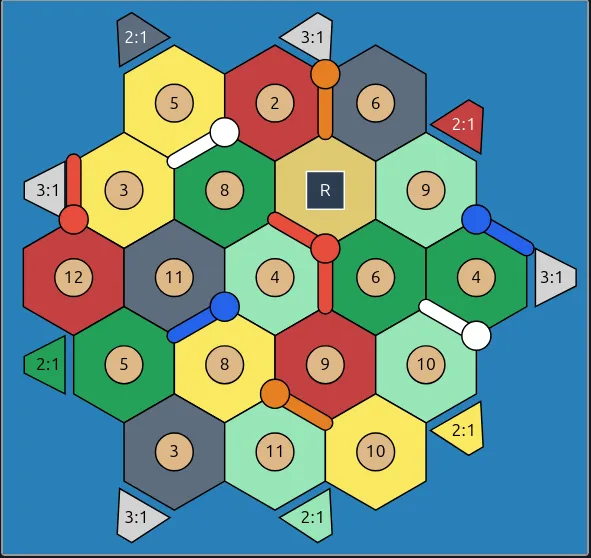
New SVG-based hexagonal grid / board. Note that this is much cleaner and scales naturally when devices are resized.
Main work
- Refreshing the existing status of the Catan project and seeing where the most obvious gaps are.
- Scaffolding a new React application.
- Using Claude Code to brainstorm better solutions to the hexagonal grid layout problem.
- Using Handy to avoid slow typing and provide better context to Claude.
- Using Claude Squad to coordinate multiple agents at the same time.
- Using Beads to provide individual stories / tasks to agents.
- Reviewing Claude output and working through the math that lays out SVG elements for the grid.
SVG Math
The Catan board is essentially a hexagonal grid with different types of items placed on it:
- Tiles
- Chits (the labels at the center of tiles)
- Settlements
- Roads
- Ports
To create the hexagonal grid, there is a bit of math involved (mostly geometry). There are a lot of great references on the math behind hexagons, so I will only cover the main idea.
Review the reference grid below that introduces a new coordinate system to effectively work with hexagonal grids. We refer to the coordinates as (q, r) tuples, where q is the column and r is the row.
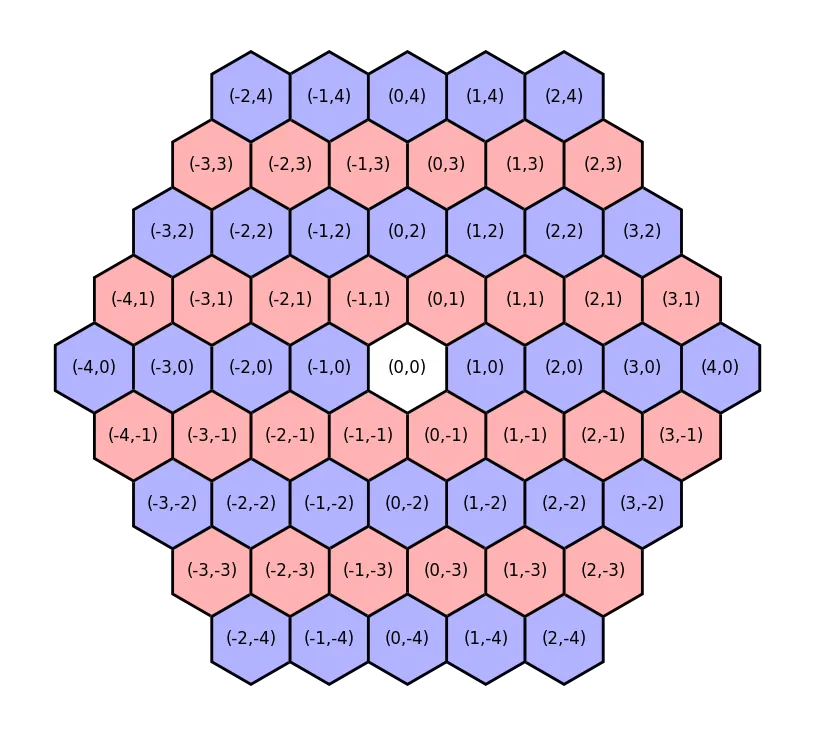
Credit to Milo Trujillo for this graphic showing the hexagonal grid coordinates.
The most awkward thing about this grid is that tiles with the same
qvalue (column) do not necessarily exist in the same vertical slice. In other words, thervalue is also needed to determine the horizontal positioning of a grid element.
The final position of every SVG element is derived from these coordinates. The SVG elements have to be defined in terms of traditional (x, y) coordinates, so we need to be able to translate back and forth between the coordinate systems.
We can determine the “traditional” center coordinate of these hexagonal coordinates with a simple linear transformation. We want to take a (q, r) pair and convert it to an (x, y) pair. Note that the matrix reflects our earlier observation that x is dependent on both q and r.
| x |              | √3   √3/2 | | q |
| y | = HEX_SIZE * |  0    3/2 | | r |
For example, with (q=2, r=2) and HEX_SIZE = 40:
x = 40 * (√3 * 2  +  (√3/2) * 2)
  = 40 * (2√3 + √3)
  = 40 * 3√3
  ≈ 40 * 5.196
  ≈ 207.85

y = 40 * (3/2) * 2
  = 40 * 3
  = 120.00

(x, y) = (207.85, 120.00)
From here, we can use the traditional Cartesian coordinates and trigonometry to find the six vertices of the hexagon.
If you’re curious, you can see the raw SVG elements that are generated in the final output. Note that the center position of the (q=2, r=2) hexagon never appears, since each hexagon is a polygon element. polygon elements are entirely defined by their vertices.
Challenges
- I haven’t used React in several years, so refreshing my knowledge of the rendering cycle and hooks was slow.
- The standard issue of Claude getting you off the ground very quickly, but needing to refactor code once the project is better defined.
- Beads was not effective for this project, since it is so small in scope.
- The entire project could fit in model context, so separate memory management was unneeded.
- The proof of concept was exploratory in nature, so planning out lots of specifications was impractical. I was figuring things out as I went.
- Creating stories was overkill. A single prompt would easily work for the tasks I was working on.
- Now that the proof of concept is complete, Beads would probably work quite well for building other similar UI features.
Learnings
- Time away from a project can give you a fresh perspective.
- You can slowly, almost subconsciously, work through problems even when you are not actively coding solutions to them.
- With more experience, you can intuit when an unsatisfying solution is truly inadequate.
- For example, how the UI was previously laid out using pixel-level math would never have looked professional. Inadequate.
- The Python script for automated testing feels unsatisfying, but is genuinely helpful for development and is not user-facing. Adequate.
- AI coding assistants are great for generating N approaches / ideas / considerations. You then review or throw out the truly bad ideas.
- SVG elements being native DOM elements is very powerful.
- For example, they can have on-click listeners, hover effects, etc.
- I was aware SVGs were native DOM elements, but did not appreciate how useful this is. I always viewed SVGs as their own thing, and didn’t fully consider them when I designed the first UI.